<?xml version="1.0" encoding="utf-8"?>
<feed xmlns="http://www.w3.org/2005/Atom">

  <title><![CDATA[Nginx Library]]></title>
  <link href="http://nginxlibrary.com/atom.xml" rel="self"/>
  <link href="http://nginxlibrary.com/"/>
  <updated>2013-11-10T02:53:26+00:00</updated>
  <id>http://nginxlibrary.com/</id>
  <author>
    <name><![CDATA[Soumik Ghosh]]></name>
    <email><![CDATA[soumik@soumikghosh.com]]></email>
  </author>
  <generator uri="http://octopress.org/">Octopress</generator>

  
  <entry>
    <title type="html"><![CDATA[Nginx configuration for XenForo]]></title>
    <link href="http://nginxlibrary.com/xenforo-configuration/"/>
    <updated>2012-04-10T19:45:53+00:00</updated>
    <id>http://nginxlibrary.com/xenforo-configuration</id>
    <content type="html"><![CDATA[<p>Writing a configuration file for XenForo is pretty simple and very similar to the <a href="http://nginxlibrary.com/wordpress-permalinks/">Wordpress configuration</a> where requests are internally redirected to the index.php file. With this configuration XenForo&#8217;s friendly URLs work perfectly, as well as external access is cut off for some directories like <code>libraries</code>
 and <code>internal_data</code>.</p>

<pre><code>server {
    listen   [::]:80;
    server_name  example.com www.example.com;
    root   /var/www/example.com;
    index  index.html index.htm index.php;
    access_log  /var/www/logs/example.com.access.log;  

    location / {
        try_files $uri $uri/ /index.php?$uri&amp;$args;
    }

    location ~ /(internal_data|library) {
         internal;
    }

    location ~ \.php$ {
        fastcgi_pass   unix:/tmp/php.socket;
        fastcgi_index  index.php;
        fastcgi_param  SCRIPT_FILENAME  $document_root$fastcgi_script_name;
        include fastcgi_params;
    }   
}
</code></pre>

<p>For a XenForo installation in a sub directory <code>xenforo</code>, the configuration should be like this:</p>

<pre><code>server {
    listen   [::]:80;
    server_name  example.com www.example.com;
    root   /var/www/example.com;
    index  index.html index.htm index.php;
    access_log  /var/www/logs/example.com.access.log;  

    location /xenforo/ {
        try_files $uri $uri/ /xenforo/index.php?$uri&amp;$args;
    }

    location ~ /xenforo/(internal_data|library) {
         internal;
    }

    location ~ \.php$ {
        fastcgi_pass   unix:/tmp/php.socket;
        fastcgi_index  index.php;
        fastcgi_param  SCRIPT_FILENAME  $document_root$fastcgi_script_name;
        include fastcgi_params;
    }   
}
</code></pre>
]]></content>
  </entry>
  
  <entry>
    <title type="html"><![CDATA[Nginx configuration for phpBB]]></title>
    <link href="http://nginxlibrary.com/phpbb-configuration/"/>
    <updated>2012-04-08T20:02:53+00:00</updated>
    <id>http://nginxlibrary.com/phpbb-configuration</id>
    <content type="html"><![CDATA[<p>I had previously <a href="http://nginxlibrary.com/converting-phpbbs-default-htaccess-for-nginx/">written an article</a> about converting phpBB&#8217;s default htaccess rules to Nginx. Here I&#8217;ll share a full-blown Nginx configuration file for serving a phpBB forum.</p>

<p>This configuration file :</p>

<blockquote><ul>
<li>Redirects www sub domain to the bare domain along with any parked domains.</li>
<li>Prevents external access to files and directories like config.php, avatar upload directory, etc.</li>
<li>Sets proper Expires header for images.</li>
</ul>
</blockquote>

<pre><code>server {
    listen   [::]:80;
    server_name  www.domain.com parkeddomain.com *.parkeddomain.com;
    rewrite ^    http://domain.com$request_uri? permanent;
}

server {
    listen   [::]:80;
    server_name  domain.com;
    root   /var/www/domain.com;
    index  index.php index.html index.htm;
    access_log  /var/logs/domain.com.access.log;

    location ~ /(config\.php|common\.php|cache|files|images/avatars/upload|includes|store) {
        deny all;
        return 403;
    }

    location ~* \.(gif|jpe?g|png|css)$ {
        expires   30d;
    }

    location ~ \.php$ {
        try_files $uri =404;
        fastcgi_pass   unix:/tmp/php.socket;
        fastcgi_index  index.php;
        fastcgi_param  SCRIPT_FILENAME  $document_root$fastcgi_script_name;
        include fastcgi_params;
    }
}
</code></pre>
]]></content>
  </entry>
  
  <entry>
    <title type="html"><![CDATA[Resolving "403 Forbidden" error]]></title>
    <link href="http://nginxlibrary.com/403-forbidden-error/"/>
    <updated>2012-01-09T15:29:45+00:00</updated>
    <id>http://nginxlibrary.com/403-forbidden-error</id>
    <content type="html"><![CDATA[<p>403 Forbidden errors are Nginx&#8217;s way of telling &#8220;You have requested for a resource but we cannot give it to you.&#8221; 403 Forbidden is technically not an error but a HTTP status code. 403 response headers are intentionally returned in many cases such as -</p>

<ul>
<li>User is blocked from requesting that page/resource or the site as a whole.</li>
<li>User tries to access a directory but <code>autoindex</code> is set to <code>off</code>.</li>
<li>User tries to access a file that can be only accessed internally.</li>
</ul>


<p>These are some among many cases where a 403 Forbidden response is intentionally returned. But here we will talk about the causes of 403 responses that are unintentional/not desired which generally occur as a result of misconfiguration on the server side.</p>

<h3>Permissions are not set correctly</h3>

<p>This is the most common cause of this error. By permissions, I do not only mean the permissions for the file that is being accessed. In order to serve a file, Nginx needs to have <em>read</em> permissions for the file as well as <em>execute</em> permissions for every hierarchial parent directory of the file to chdir to it. For example, to access the file located at -</p>

<pre><code>/usr/share/myfiles/image.jpg
</code></pre>

<p>Nginx needs to have <em>read</em> permissions for the file as well as <em>execute</em> permissions for <code>/</code>, <code>/usr</code>, <code>/usr/share</code> and <code>/usr/share/myfiles</code>. If you use the standard 755 for directories and 644 for files (umask: 022), you should not run into this problem.</p>

<p>To check for ownership and permissions on a path, we can use the <code>namei</code> utility like this -</p>

<pre><code>$ namei -l /var/www/vhosts/example.com

f: /var/www/vhosts/example.com
drwxr-xr-x root     root     /
drwxr-xr-x root     root     var
drwxr-xr-x www-data www-data www
drwxr-xr-x www-data www-data vhosts
drwxr-xr-x clara    clara    example.com
</code></pre>

<h3>Directory index is not properly defined</h3>

<p>Sometimes, the index directive does not contain the desired directory index. For example, for a standard setup with PHP, the index directive should be -</p>

<pre><code>index index.html index.htm index.php;
</code></pre>

<p>According to this example, when a directory is acessed directly, Nginx will try to serve index.html, then index.htm and index.php after that. If none of them are found, Nginx will return a 403 header. If index.php were not defined in the root directive, Nginx would have returned 403 without checking for the existence of index.php.</p>

<p>Similarly, for a Python setup, index.py should be defined as a directory index.</p>

<p>These are the most common causes of undesired 403 responses. Feel free to leave a comment if you are still getting 403s.</p>
]]></content>
  </entry>
  
  <entry>
    <title type="html"><![CDATA[Using CloudFlare for country blocking]]></title>
    <link href="http://nginxlibrary.com/using-cloudflare-for-country-blocking/"/>
    <updated>2011-12-29T06:10:59+00:00</updated>
    <id>http://nginxlibrary.com/using-cloudflare-for-country-blocking</id>
    <content type="html"><![CDATA[<p><img class="right" src="http://nginxlibrary.com/images/post-images/2011/cloudflare-logo.png" width="244" height="40"></p>

<p><a href="https://www.cloudflare.com/" title="CloudFlare">CloudFlare</a> is an innovative service, providing
webmasters with a CDN (Content Delivery Network) and <a href="https://www.cloudflare.com/overview" title="CloudFlare features overview">many other things</a>.
Among these other things, it provides an IP geolocation service using which we
can use to redirect/block visitors from specific countries.</p>

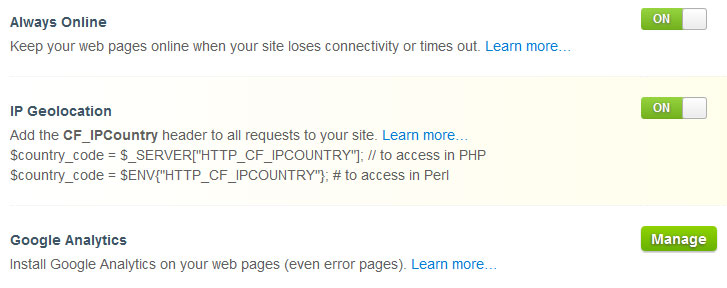
<p>We need to first enable &#8216;IP Geolocation&#8217; in the CloudFlare settings for this
to work -</p>

<p><a href="http://nginxlibrary.com/images/post-images/2011/ip_geolocation.jpg"><img src="http://nginxlibrary.com/images/post-images/2011/ip_geolocation.jpg" title="IP geolocation" alt="IP geolocation" /></a></p>

<p>We also need to make sure that the A record for the domain/sub domain is being
proxied though the CloudFlare proxy. So, enable CloudFlare for the relevant A
record from the DNS settings if it hasn&#8217;t been set accordingly.</p>

<p>If everything is done properly, the HTTP_CF_IPCOUNTRY environment variable
should contain the country code for the visitor. To test it, we can write a
small script in Perl.</p>

<figure class='code'><figcaption><span></span></figcaption><div class="highlight"><table><tr><td class="gutter"><pre class="line-numbers"><span class='line-number'>1</span>
<span class='line-number'>2</span>
</pre></td><td class='code'><pre><code class='perl'><span class='line'><span class="c1">#!/usr/bin/perl</span>
</span><span class='line'><span class="k">print</span> <span class="s">&quot;Content-type: text/html\n\n$ENV{&#39;HTTP_CF_IPCOUNTRY&#39;}&quot;</span><span class="p">;</span>
</span></code></pre></td></tr></table></div></figure>


<p>Run the script and it should show you your country code. A list of country
codes can be found <a href="http://www.maxmind.com/app/iso3166">here</a>.</p>

<p>Now, we need to take care of the Nginx configuration. We need to map the
environment variable to a variable of our own, so that the value of our
variable changes depending on whether we want to allow visitors from the
country or not.</p>

<p>We need to put the following code inside the http block but outside the server
block for your website. It can be put in <code>/etc/nginx/nginx.conf</code> inside the
HTTP block or in your vhosts file, outside of the server block.</p>

<pre><code>map $http_cf_ipcountry $allow {
        default yes;
        CN no;
        MX no;
        NO no;
}
</code></pre>

<p>This sets <code>$allow</code> to yes or no, depending on the country of the visitor.
Here, we are setting the variable to no if the visitor is from China, Mexico,
or Norway. We can also set the default to no, and allow countries one by one
if we need to allow only a few countries and block all others. Now that the
variable is set, we need to instruct Nginx to serve a 403 page to the visitors
from the blocked countries. Add this anywhere inside the server block :</p>

<pre><code>if ($allow = no) {
    return 403;
}
</code></pre>

<p>This will make Nginx return a 403 Forbidden HTTP status code. A custom 403
error page can also be defined to make the error page more helpful.</p>

<p>If you are not using CloudFlare, you can still block visitors by country <a href="http://nginxlibrary.com/ip-based-country-blocking/">using the GeoIP module</a>.</p>
]]></content>
  </entry>
  
  <entry>
    <title type="html"><![CDATA[Nginx 1.0.11 has been released]]></title>
    <link href="http://nginxlibrary.com/nginx-1-0-11-has-been-released/"/>
    <updated>2011-12-16T03:08:30+00:00</updated>
    <id>http://nginxlibrary.com/nginx-1-0-11-has-been-released</id>
    <content type="html"><![CDATA[<p>Nginx 1.0.11 has been released.</p>

<p>Download it : <a href="http://nginx.org/en/download.html" title="Download Nginx">http://nginx.org/en/download.html</a></p>

<p><a href="http://forum.nginx.org/read.php?27,218365">The changes</a> include :</p>

<ul>
<li><p>Change: now double quotes are encoded in an &#8220;echo&#8221; SSI-command output. Thanks to Zaur Abasmirzoev.</p></li>
<li><p>Feature: the &#8220;image_filter_sharpen&#8221; directive.</p></li>
<li><p>Bugfix: a segmentation fault might occur in a worker process if SNI was used; the bug had appeared in 1.0.9.</p></li>
<li><p>Bugfix: SIGWINCH signal did not work after first binary upgrade; the bug had appeared in 1.0.9.</p></li>
<li><p>Bugfix: the &#8220;If-Modified-Since&#8221;, &#8220;If-Range&#8221;, etc. client request header lines might be passed to backend while caching; or not passed without caching if caching was enabled in another part of the configuration.</p></li>
<li><p>Bugfix: in the &#8220;scgi_param&#8221; directive, if complex parameters were used.</p></li>
<li><p>Bugfix: &#8220;add_header&#8221; and &#8220;expires&#8221; directives did not work if a request was proxied and response status code was 206.</p></li>
<li><p>Bugfix: in the &#8220;expires @time&#8221; directive.</p></li>
<li><p>Bugfix: in the ngx_http_flv_module. Thanks to Piotr Sikora.</p></li>
<li><p>Bugfix: in the ngx_http_mp4_module.</p></li>
<li><p>Bugfix: nginx could not be built on FreeBSD 10.</p></li>
<li><p>Bugfix: nginx could not be built on AIX.</p></li>
</ul>

]]></content>
  </entry>
  
  <entry>
    <title type="html"><![CDATA[Nginx 1.0.10 has been released]]></title>
    <link href="http://nginxlibrary.com/nginx-1-0-10-has-been-released/"/>
    <updated>2011-11-15T07:11:03+00:00</updated>
    <id>http://nginxlibrary.com/nginx-1-0-10-has-been-released</id>
    <content type="html"><![CDATA[<p>Nginx 1.0.10 has been released.</p>

<p>Download it : <a href="http://nginx.org/en/download.html" title="Download Nginx">http://nginx.org/en/download.html</a></p>

<p><a href="http://forum.nginx.org/read.php?27,218365">The changes</a> include :</p>

<ul>
<li><p>Bugfix: a segmentation fault might occur in a worker process if resolver got a big DNS response. Thanks to Ben Hawkes.</p></li>
<li><p>Bugfix: in cache key calculation if internal MD5 implementation was used; the bug had appeared in 1.0.4.</p></li>
<li><p>Bugfix: the module ngx_http_mp4_module sent incorrect &#8220;Content-Length&#8221; response header line if the &#8220;start&#8221; argument was used. Thanks to Piotr Sikora.</p></li>
</ul>

]]></content>
  </entry>
  
  <entry>
    <title type="html"><![CDATA[Nginx 1.0.9 has been released]]></title>
    <link href="http://nginxlibrary.com/nginx-1-0-9-has-been-released/"/>
    <updated>2011-11-01T13:06:46+00:00</updated>
    <id>http://nginxlibrary.com/nginx-1-0-9-has-been-released</id>
    <content type="html"><![CDATA[<p>Nginx 1.0.9 has been released.</p>

<p>Download it : <a href="http://nginx.org/en/download.html" title="Download Nginx">http://nginx.org/en/download.html</a></p>

<p><a href="http://forum.nginx.org/read.php?27,217643">The changes</a> include :</p>

<ul>
<li><p>Change: now the 0x7F-0x1F characters are escaped as \xXX in an access_log.</p></li>
<li><p>Change: now SIGWINCH signal works only in daemon mode.</p></li>
<li><p>Feature: &#8220;proxy/fastcgi/scgi/uwsgi_ignore_headers&#8221; directives support the following additional values: X-Accel-Limit-Rate, X-Accel-Buffering, X-Accel-Charset.</p></li>
<li><p>Feature: decrease of memory consumption if SSL is used.</p></li>
<li><p>Feature: accept filters are now supported on NetBSD.</p></li>
<li><p>Feature: the &#8220;uwsgi_buffering&#8221; and &#8220;scgi_buffering&#8221; directives. Thanks to Peter Smit.</p></li>
<li><p>Bugfix: a segmentation fault occurred on start or while reconfiguration if the &#8220;ssl&#8221; directive was used at http level and there was no &#8220;ssl_certificate&#8221; defined.</p></li>
<li><p>Bugfix: some UTF-8 characters were processed incorrectly. Thanks to Alexey Kuts.</p></li>
<li><p>Bugfix: the ngx_http_rewrite_module directives specified at &#8220;server&#8221; level were executed twice if no matching locations were defined.</p></li>
<li><p>Bugfix: a socket leak might occurred if &#8220;aio sendfile&#8221; was used.</p></li>
<li><p>Bugfix: connections with fast clients might be closed after send_timeout if file AIO was used.</p></li>
<li><p>Bugfix: in the ngx_http_autoindex_module.</p></li>
<li><p>Bugfix: the module ngx_http_mp4_module did not support seeking on 32-bit platforms.</p></li>
<li><p>Bugfix: non-cacheable responses might be cached if &#8220;proxy_cache_bypass&#8221; directive was used. Thanks to John Ferlito.</p></li>
<li><p>Bugfix: cached responses with an empty body were returned incorrectly; the bug had appeared in 0.8.31.</p></li>
<li><p>Bugfix: 201 responses of the ngx_http_dav_module were incorrect; the bug had appeared in 0.8.32.</p></li>
<li><p>Bugfix: in the &#8220;return&#8221; directive.</p></li>
<li><p>Bugfix: the &#8220;ssl_verify_client&#8221;, &#8220;ssl_verify_depth&#8221;, and &#8220;ssl_prefer_server_ciphers&#8221; directives might work incorrectly if SNI was used.</p></li>
</ul>

]]></content>
  </entry>
  
  <entry>
    <title type="html"><![CDATA[Nginx 1.0.8 has been released]]></title>
    <link href="http://nginxlibrary.com/nginx-1-0-8-has-been-released/"/>
    <updated>2011-10-01T11:03:51+00:00</updated>
    <id>http://nginxlibrary.com/nginx-1-0-8-has-been-released</id>
    <content type="html"><![CDATA[<p>Nginx 1.0.8 has been released.</p>

<p>Download it : <a href="http://nginx.org/en/download.html" title="Download Nginx">http://nginx.org/en/download.html</a></p>

<p><a href="http://forum.nginx.org/read.php?27,216141">The changes</a> include :</p>

<ul>
<li>Bugfix: nginx could not be built &#8211;with-http_mp4_module and without &#8211;with-debug option.</li>
</ul>

]]></content>
  </entry>
  
  <entry>
    <title type="html"><![CDATA[Nginx 1.0.7 has been released]]></title>
    <link href="http://nginxlibrary.com/nginx-1-0-7-has-been-released/"/>
    <updated>2011-09-30T14:59:02+00:00</updated>
    <id>http://nginxlibrary.com/nginx-1-0-7-has-been-released</id>
    <content type="html"><![CDATA[<p>Nginx 1.0.7 has been released.</p>

<p>Download it : <a href="http://nginx.org/en/download.html" title="Download Nginx">http://nginx.org/en/download.html</a></p>

<p><a href="http://forum.nginx.org/read.php?27,216114">The changes</a> include :</p>

<ul>
<li><p>Change: now if total size of all ranges is greater than source response size, then nginx disables ranges and returns just the source response.</p></li>
<li><p>Feature: the &#8220;max_ranges&#8221; directive.</p></li>
<li><p>Feature: the module ngx_http_mp4_module.</p></li>
<li><p>Feature: the &#8220;worker_aio_requests&#8221; directive.</p></li>
<li><p>Bugfix: if nginx was built &#8211;with-file-aio it could not be run on Linux kernel which did not support AIO.</p></li>
<li><p>Bugfix: in Linux AIO error processing. Thanks to Hagai Avrahami.</p></li>
<li><p>Bugfix: in Linux AIO combined with open_file_cache.</p></li>
<li><p>Bugfix: open_file_cache did not update file info on retest if file was not atomically changed.</p></li>
<li><p>Bugfix: reduced memory consumption for long-lived requests.</p></li>
<li><p>Bugfix: in the &#8220;proxy/fastcgi/scgi/uwsgi_ignore_client_abort&#8221; directives.</p></li>
<li><p>Bugfix: nginx could not be built on MacOSX 10.7.</p></li>
<li><p>Bugfix: in the &#8220;proxy/fastcgi/scgi/uwsgi_ignore_client_abort&#8221; directives.</p></li>
<li><p>Bugfix: request body might be processed incorrectly if client used pipelining.</p></li>
<li><p>Bugfix: in the &#8220;request_body_in_single_buf&#8221; directive.</p></li>
<li><p>Bugfix: in &#8220;proxy_set_body&#8221; and &#8220;proxy_pass_request_body&#8221; directives if SSL connection to backend was used.</p></li>
<li><p>Bugfix: nginx hogged CPU if all servers in an upstream were marked as &#8220;down&#8221;.</p></li>
<li><p>Bugfix: a segmentation fault might occur during reconfiguration if ssl_session_cache was defined but not used in previous configuration.</p></li>
<li><p>Bugfix: a segmentation fault might occur in a worker process if many backup servers were used in an upstream.</p></li>
</ul>

]]></content>
  </entry>
  
  <entry>
    <title type="html"><![CDATA[Nginx 1.0.6 has been released]]></title>
    <link href="http://nginxlibrary.com/nginx-1-0-6-has-been-released/"/>
    <updated>2011-08-30T10:55:51+00:00</updated>
    <id>http://nginxlibrary.com/nginx-1-0-6-has-been-released</id>
    <content type="html"><![CDATA[<p>Nginx 1.0.6 has been released.</p>

<p>Download it : <a href="http://nginx.org/en/download.html" title="Download Nginx">http://nginx.org/en/download.html</a></p>

<p><a href="http://forum.nginx.org/read.php?27,214440">The changes</a> include :</p>

<ul>
<li><p>Feature: cache loader run time decrease.</p></li>
<li><p>Feature: loading time decrease of configuration with large number of HTTPS sites.</p></li>
<li><p>Feature: now nginx supports ECDHE key exchange ciphers. Thanks to Adrian Kotelba.</p></li>
<li><p>Feature: the &#8220;lingering_close&#8221; directive.</p></li>
<li><p>Feature: now shared zones and caches use POSIX semaphores on Solaris. Thanks to Den Ivanov.</p></li>
<li><p>Bugfix: nginx could not be built on Linux 3.0.</p></li>
<li><p>Bugfix: a segmentation fault might occur in a worker process if &#8220;fastcgi/scgi/uwsgi_param&#8221; directives were used with values starting with &#8220;HTTP_&#8221;; the bug had appeared in 0.8.40.</p></li>
<li><p>Bugfix: in closing connection for pipelined requests.</p></li>
<li><p>Bugfix: nginx did not disable gzipping if client sent &#8220;gzip;q=0&#8221; in &#8220;Accept-Encoding&#8221; request header line.</p></li>
<li><p>Bugfix: in timeout in unbuffered proxied mode.</p></li>
<li><p>Bugfix: memory leaks when a &#8220;proxy_pass&#8221; directive contains variables and proxies to an HTTPS backend.</p></li>
<li><p>Bugfix: in parameter validaiton of a &#8220;proxy_pass&#8221; directive with variables. Thanks to Lanshun Zhou.</p></li>
<li><p>Bugfix: SSL did not work on QNX.</p></li>
<li><p>Bugfix: SSL modules could not be built by gcc 4.6 without &#8211;with-debug option.</p></li>
</ul>

]]></content>
  </entry>
  
  <entry>
    <title type="html"><![CDATA[Hotlink protection in Nginx]]></title>
    <link href="http://nginxlibrary.com/hotlink-protection/"/>
    <updated>2011-08-19T02:30:57+00:00</updated>
    <id>http://nginxlibrary.com/hotlink-protection</id>
    <content type="html"><![CDATA[<p>Hotlinked files can be a major cause for bandwidth leeching for some sites.
Here&#8217;s how you can hotlink protect your images and other file types using a
simple location directive in your Nginx configuration file :</p>

<pre><code>location ~ \.(jpe?g|png|gif)$ {
     valid_referers none blocked mysite.com *.mysite.com;
     if ($invalid_referer) {
        return   403;
    }
}
</code></pre>

<p>Use the pipe (&#8220;|&#8221;) to separate file extensions you want to hotlink protect.</p>

<p>The <code>valid_referers</code> directive contains the list of site for whom hotlinking
is allowed. Here is an explanation of the parameters for the <code>valid_referers</code>
directive :</p>

<ul>
<li>none - Matches the requests with no Referrer header.</li>
<li>blocked - Matches the requests with blocked Referrer header.</li>
<li>*.mydomain.com - Matches all the sub domains of mydomain.com. Since v0.5.33, * wildcards can be used in the server names.</li>
</ul>


<p>You can also tweak the location directive for blocking files from a specific
directory. Like this :</p>

<pre><code>location /images/ {
     valid_referers none blocked mysite.com *.mysite.com;
     if ($invalid_referer) {
        return   403;
    }
}
</code></pre>

<p>This will hotlink protect every file in any images directory.</p>
]]></content>
  </entry>
  
  <entry>
    <title type="html"><![CDATA[Hide Nginx version]]></title>
    <link href="http://nginxlibrary.com/hide-nginx-version/"/>
    <updated>2011-07-30T01:58:11+00:00</updated>
    <id>http://nginxlibrary.com/hide-nginx-version</id>
    <content type="html"><![CDATA[<p>If you are using an old version of Nginx or if you want to explicitly hide the Nginx version in your HTTP headers and your default error pages, you can use the <code>server_tokens</code> directive in your Nginx configuration. The server_tokens directive can be used either in the http, server or location block.</p>

<p>Just set <code>server_tokens</code> to <code>off</code> (it is set to <code>on</code> by default) to hide your Nginx version in all externally visible places.</p>

<pre><code>server_tokens off;
</code></pre>

<p>Just like using Apache&#8217;s ServerSignature and ServerTokens directive, your Nginx version should now be hidden in the server signature and the default error pages. To check the server headers, use the <a href="http://www.webconfs.com/http-header-check.php" title="HTTP Header Checker">HTTP Header Checker utility</a> from Webconfs.com.</p>
]]></content>
  </entry>
  
  <entry>
    <title type="html"><![CDATA[Check Nginx version]]></title>
    <link href="http://nginxlibrary.com/check-nginx-version/"/>
    <updated>2011-07-24T07:14:21+00:00</updated>
    <id>http://nginxlibrary.com/check-nginx-version</id>
    <content type="html"><![CDATA[<p>We can retrieve the version of Nginx currently installed by calling the Nginx
binary with some command-line parameters. We can use the <strong>-v</strong> parameter to
display the Nginx version only, or use the <strong>-V</strong> parameter to display the
version, along with the compiler version and configuration parameters.</p>

<p>Example outputs :</p>

<pre><code>$ nginx -v
nginx version: nginx/0.8.54

$ nginx -V
nginx version: nginx/0.8.54
TLS SNI support enabled
configure arguments: --conf-path=/etc/nginx/nginx.conf --error-log-path=/var/log/nginx/error.log --http-client-body-temp-path=/var/lib/nginx/body --http-fastcgi-temp-path=/var/lib/nginx/fastcgi --http-log-path=/var/log/nginx/access.log --http-proxy-temp-path=/var/lib/nginx/proxy --http-scgi-temp-path=/var/lib/nginx/scgi --http-uwsgi-temp-path=/var/lib/nginx/uwsgi --lock-path=/var/lock/nginx.lock --pid-path=/var/run/nginx.pid --with-debug --with-http_addition_module --with-http_dav_module --with-http_geoip_module --with-http_gzip_static_module --with-http_image_filter_module --with-http_realip_module --with-http_stub_status_module --with-http_ssl_module --with-http_sub_module --with-http_xslt_module --with-ipv6 --with-sha1=/usr/include/openssl --with-md5=/usr/include/openssl --with-mail --with-mail_ssl_module --add-module=/build/buildd/nginx-0.8.54/debian/modules/nginx-upstream-fair
</code></pre>
]]></content>
  </entry>
  
  <entry>
    <title type="html"><![CDATA[Nginx 1.0.5 has been released]]></title>
    <link href="http://nginxlibrary.com/nginx-1-0-5-has-been-released/"/>
    <updated>2011-07-19T06:42:10+00:00</updated>
    <id>http://nginxlibrary.com/nginx-1-0-5-has-been-released</id>
    <content type="html"><![CDATA[<p>Nginx 1.0.5 has been released.</p>

<p>Download it : <a href="http://nginx.org/en/download.html" title="Download Nginx">http://nginx.org/en/download.html</a></p>

<p><a href="http://forum.nginx.org/read.php?27,212624">The changes</a> include :</p>

<ul>
<li>Change: now default SSL ciphers are &#8220;HIGH:!aNULL:!MD5&#8221;. Thanks to Rob Stradling.</li>
<li>Feature: the &#8220;referer_hash_max_size&#8221; and &#8220;referer_hash_bucket_size&#8221; directives. Thanks to Witold Filipczyk.</li>
<li>Feature: $uid_reset variable.</li>
<li>Bugfix: a segmentation fault might occur in a worker process, if a caching was used. Thanks to Lanshun Zhou.</li>
<li>Bugfix: worker processes may got caught in an endless loop during reconfiguration, if a caching was used; the bug had appeared in 0.8.48. Thanks to Maxim Dounin.</li>
<li>Bugfix: &#8220;stalled cache updating&#8221; alert. Thanks to Maxim Dounin.</li>
</ul>

]]></content>
  </entry>
  
  <entry>
    <title type="html"><![CDATA[Setting up PHP FastCGI]]></title>
    <link href="http://nginxlibrary.com/php-fastcgi/"/>
    <updated>2011-07-07T04:20:54+00:00</updated>
    <id>http://nginxlibrary.com/php-fastcgi</id>
    <content type="html"><![CDATA[<p>In a previous post, we had written about setting up Perl-FastCGI on Nginx.
This article is about setting up PHP-FastCGI. As always, this article assumes
that you are running on Debian Squeeze (or above) and uses aptitude/apt-get
for fetching and installing packages.</p>

<p>Install these packages :</p>

<pre><code>apt-get install nginx php5-cgi
</code></pre>

<p>We&#8217;ll now replace Nginx&#8217;s package maintainer&#8217;s vhosts file with our own.</p>

<pre><code>mv /etc/nginx/sites-available/default /etc/nginx/sites-available/default.old
vi /etc/nginx/sites-available/default
</code></pre>

<p>Put this in the file :</p>

<pre><code>server {
    listen   [::]:80;
    server_name  example.com; # Replace this with your own
    root   /var/www/example.com;
    index  index.html index.htm index.php;
    access_log  /var/www/logs/example.com.access.log;  

    location ~ \.php$ {
        try_files $uri =404;
        fastcgi_pass   unix:/tmp/php.socket;
        fastcgi_index  index.php;
        fastcgi_param  SCRIPT_FILENAME  $document_root$fastcgi_script_name;
        include fastcgi_params;
    }   
}
</code></pre>

<p>Now, there are some tutorials on the internet which wrongly configure Nginx and introduce an arbitrary code execution bug. Note that Nginx passes a request to the php-cgi daemon if the <code>REQUEST_URI</code> has a trailing <code>.php</code>. It does not check whether the file exists or not. Suppose a request is made for <code>/images/dog.jpg/test.php</code>. Nginx will match the trailing <code>.php</code> and pass the request to php-cgi. Now, if test.php does not exist and <code>cgi.fix_pathinfo</code> is set to 1, php-cgi will  try to execute <code>/images/dog.jpg</code> with <code>/test.php</code> as pathinfo. This is especially dangerous if you have a public upload directory. In our configuration, this will not happen even if <code>cgi.fix_pathinfo</code> is set to 1. The <code>try_files $uri =404;</code> line checks for the existence of the .php file and returns a 404 response header if it does not exist. Alternatively, <code>cgi.fix_pathinfo</code> can be set to 0, but is is not required as our configuration takes care of it.</p>

<p>Now we&#8217;ll use a Debian init script to control the php-cgi daemon which will be
running on port 9000.</p>

<pre><code>vi /etc/init.d/php-fcgi
</code></pre>

<p>Add this in the file :</p>

<pre><code>#!/bin/bash
### BEGIN INIT INFO
# Provides:          php-cgi
# Required-Start:    networking
# Required-Stop:     networking
# Default-Start:     2 3 4 5
# Default-Stop:      0 1 6
# Short-Description: Start the PHP FastCGI daemon.
### END INIT INFO  
BIND=/tmp/php.socket
USER=www-data
PHP_FCGI_CHILDREN=2
PHP_FCGI_MAX_REQUESTS=5000  
PHP_CGI=/usr/bin/php-cgi
PHP_CGI_NAME=`basename $PHP_CGI`
PHP_CGI_ARGS="- USER=$USER PATH=/usr/bin PHP_FCGI_CHILDREN=$PHP_FCGI_CHILDREN PHP_FCGI_MAX_REQUESTS=$PHP_FCGI_MAX_REQUESTS $PHP_CGI -b $BIND"
RETVAL=0  
start() {
      echo -n "Starting PHP FastCGI: "
      start-stop-daemon --quiet --start --background --chuid "$USER" --exec /usr/bin/env -- $PHP_CGI_ARGS
      RETVAL=$?
      echo "$PHP_CGI_NAME."
}
stop() {
      echo -n "Stopping PHP FastCGI: "
      killall -q -w -u $USER $PHP_CGI
      RETVAL=$?
      echo "$PHP_CGI_NAME."
}  
case "$1" in
    start)
      start
  ;;
    stop)
      stop
  ;;
    restart)
      stop
      start
  ;;
    *)
      echo "Usage: php-fcgi {start|stop|restart}"
      exit 1
  ;;
esac
exit $RETVAL
</code></pre>

<p>This can also be done in one line if you have shell access on your server :</p>

<pre><code>wget http://nginxlibrary.com/downloads/php-fcgi/php-fcgi -O /etc/init.d/php-fcgi
</code></pre>

<p>Give the file executable permissions and make it start during booting :</p>

<pre><code>chmod +x /etc/init.d/php-fcgi &amp;&amp; insserv php-fcgi
</code></pre>

<p>Finally, start the fastcgi daemon :</p>

<pre><code>invoke-rc.d php-fcgi start
</code></pre>

<p>To check that it is working properly, create this file :</p>

<pre><code>vi /var/www/example.com/info.php
</code></pre>

<p>Put this in it :</p>

<pre><code>&lt;?php phpinfo(); ?&gt;
</code></pre>

<p>Now go to <code>http://example.com/info.php</code> and you&#8217;ll get the PHP information
page showing information about the loaded modules.</p>

<p>Now, there are a couple of options you can change in the PHP-FastCGI init
script, namely, <code>PHP_FCGI_CHILDREN</code> and <code>PHP_FCGI_MAX_REQUESTS</code>.
<code>PHP_FCGI_CHILDREN</code> specifies the number of child processes the php-cgi master
process will spawn. Usually, two, or, even one is sufficient for a medium-
traffic site. <code>PHP_FCGI_MAX_REQUESTS</code> specifies the number of requests each
child process will serve before being terminated and respawned.</p>
]]></content>
  </entry>
  
  <entry>
    <title type="html"><![CDATA[Installing the latest version of Nginx on Debian]]></title>
    <link href="http://nginxlibrary.com/debian-latest-nginx/"/>
    <updated>2011-06-05T04:32:39+00:00</updated>
    <id>http://nginxlibrary.com/debian-latest-nginx</id>
    <content type="html"><![CDATA[<p>The Nginx package in the Debian stable repositories can be quite outdated. It
is often several version behind the latest, whereas the Nginx package from the
testing/unstable repositories is updated frequently with newer versions of
Nginx. We can use apt-pinning to get the a newer version of Nginx (the one
present in the testing/unstable repositories) and it&#8217;s dependencies (if
required) will be met from the testing/unstable repositories as well.</p>

<p>Let us first add the testing/unstable repositories to the software sources
list.</p>

<pre><code>vi /etc/apt/sources.list
</code></pre>

<p>Add these lines at the end of the file :</p>

<pre><code>deb http://ftp.debian.org/debian/ testing main contrib non-free
deb-src http://ftp.debian.org/debian/ testing main contrib non-free
</code></pre>

<p>Replace <code>testing</code> with <code>unstable</code> if you want to add the unstable repositories
instead of testing.</p>

<p>Now we need to pin the nginx package in testing/unstable to a higher priority
so that it gets selected. Actually, in Debian, nginx is a meta-package that
selects the <a href="http://packages.debian.org/testing/nginx-full">nginx-full</a> package. So, if you want to use <a href="http://packages.debian.org/testing/nginx-light">nginx-light</a>
or <a href="http://packages.debian.org/testing/nginx-extras">nginx-extras</a>, use them instead of just &#8220;nginx&#8221;.</p>

<pre><code>vi /etc/apt/preferences
</code></pre>

<p>Add these lines :</p>

<pre><code>Package: nginx
Pin: release a=testing
Pin-Priority: 900
</code></pre>

<p>As explained before, you can use nginx-light or nginx-extra instead of nginx
here. You can also use unstable instead of testing.</p>

<p>Now, run :</p>

<pre><code>apt-get update
</code></pre>

<p>Check whether the newer version of nginx is selected for install by running :</p>

<pre><code>apt-cache policy nginx
</code></pre>

<p>Finally, install/upgrade nginx by running :</p>

<pre><code>apt-get install nginx
</code></pre>

<p>or</p>

<pre><code>apt-get upgrade nginx
</code></pre>

<p>You&#8217;ll have a relatively newer version of Nginx installed after finishing
this.</p>
]]></content>
  </entry>
  
  <entry>
    <title type="html"><![CDATA[Nginx 1.0.4 has been released]]></title>
    <link href="http://nginxlibrary.com/nginx-1-0-4-has-been-released/"/>
    <updated>2011-06-01T06:40:52+00:00</updated>
    <id>http://nginxlibrary.com/nginx-1-0-4-has-been-released</id>
    <content type="html"><![CDATA[<p>Nginx 1.0.4 has been released.</p>

<p>Download it : <a href="http://nginx.org/en/download.html" title="Download Nginx">http://nginx.org/en/download.html</a></p>

<p><a href="http://forum.nginx.org/read.php?2,202918,207036">The changes</a> include :</p>

<ul>
<li>Change: now regular expressions case sensitivity in the &#8220;map&#8221; directive is given by prefixes &#8220;~&#8221; or &#8220;~*&#8221;.</li>
<li>Feature: now shared zones and caches use POSIX semaphores on Linux. Thanks to Denis F. Latypoff.</li>
<li>Bugfix: &#8220;stalled&#8221; cache updating&#8221; alert.</li>
<li>Bugfix: nginx could not be built &#8211;without-http_auth_basic_module; the bug had appeared in 1.0.3.</li>
</ul>

]]></content>
  </entry>
  
  <entry>
    <title type="html"><![CDATA[Nginx 1.0.3 has been released]]></title>
    <link href="http://nginxlibrary.com/nginx-1-0-3-has-been-released/"/>
    <updated>2011-05-25T06:42:04+00:00</updated>
    <id>http://nginxlibrary.com/nginx-1-0-3-has-been-released</id>
    <content type="html"><![CDATA[<p>Nginx 1.0.3 has been released.</p>

<p>Download it : <a href="http://nginx.org/en/download.html" title="Download Nginx">http://nginx.org/en/download.html</a></p>

<p><a href="http://forum.nginx.org/read.php?27,200796,200796">The changes</a> include :</p>

<ul>
<li><p>Feature: the &#8220;auth_basic_user_file&#8221; directive supports &#8220;$apr1&#8221;, &#8220;{PLAIN}&#8221;, and &#8220;{SSHA}&#8221; password encryption methods. Thanks to Maxim Dounin.</p></li>
<li><p>Feature: the &#8220;geoip_org&#8221; directive and $geoip_org variable. Thanks to Alexander Uskov, Arnaud Granal, and Denis F. Latypoff.</p></li>
<li><p>Feature: ngx_http_geo_module and ngx_http_geoip_module support IPv4 addresses mapped to IPv6 addresses.</p></li>
<li><p>Bugfix: a segmentation fault occurred in a worker process during testing IPv4 address mapped to IPv6 address, if access or deny rules were defined only for IPv6; the bug had appeared in 0.8.22.</p></li>
<li><p>Bugfix: a cached reponse may be broken if proxy/fastcgi/scgi/ uwsgi_cache_bypass and proxy/fastcgi/scgi/uwsgi_no_cache directive values were different; the bug had appeared in 0.8.46.</p></li>
</ul>

]]></content>
  </entry>
  
  <entry>
    <title type="html"><![CDATA[Converting phpBB's default .htaccess for nginx]]></title>
    <link href="http://nginxlibrary.com/converting-phpbbs-default-htaccess-for-nginx/"/>
    <updated>2011-05-11T11:50:53+00:00</updated>
    <id>http://nginxlibrary.com/converting-phpbbs-default-htaccess-for-nginx</id>
    <content type="html"><![CDATA[<p>phpBB ships with a small .htaccess file in the root that has rules to
deny access to the config.php and common.php files in the absence of a PHP
interpreter. I&#8217;ll duplicate those rules for an Nginx configuration.</p>

<p>Here&#8217;s how the .htaccess file looks like :</p>

<pre><code>Order Allow,Deny
Deny from All

Order Allow,Deny
Deny from All
</code></pre>

<p>And here&#8217;s what you need to add to your Nginx configuration file in order to
duplicate that behaviour :</p>

<pre><code>location ~ /config.php|/common.php {
    deny all;
}
</code></pre>

<p>This will deny access to all instances of config/common.php located in the
document root, regardless of where they are located.</p>
]]></content>
  </entry>
  
  <entry>
    <title type="html"><![CDATA[Nginx 1.0.2 has been released]]></title>
    <link href="http://nginxlibrary.com/nginx-1-0-2-has-been-released/"/>
    <updated>2011-05-11T00:57:13+00:00</updated>
    <id>http://nginxlibrary.com/nginx-1-0-2-has-been-released</id>
    <content type="html"><![CDATA[<p>Nginx 1.0.2 has been released.</p>

<p>Download it : <a href="http://nginx.org/en/download.html" title="Download Nginx">http://nginx.org/en/download.html</a></p>

<p><a href="http://forum.nginx.org/read.php?27,196950,196950">The changes</a> include :</p>

<ul>
<li>Feature: now shared zones and caches use POSIX semaphores.</li>
<li>Bugfix: in the &#8220;rotate&#8221; parameter of the &#8220;image_filter&#8221; directive. Thanks to Adam Bocim.</li>
<li>Bugfix: nginx could not be built on Solaris; the bug had appeared in 1.0.1.</li>
</ul>

]]></content>
  </entry>
  
</feed>